> ## Documentation Index
> Fetch the complete documentation index at: https://docs.pullfrog.com/llms.txt
> Use this file to discover all available pages before exploring further.
# BYOK
Pullfrog supports BYOK (bring your own key) for every [supported provider](/models#supported-providers) — and, through GitHub Actions secrets, for [providers with no console card](/models#custom-providers) as well. You control the provider, the spend, and the data.
BYOK is the recommended setup: you keep your existing provider relationship, rate limits, and billing, and you pay the provider directly at their prices. If you'd rather not manage keys at all, [Pullfrog Router](/billing#pullfrog-router) reaches every model through Pullfrog's gateway at raw provider cost with no markup.
If you want to use **Codex access from your ChatGPT account** instead of buying OpenAI API tokens, see [Codex subscription](/codex-auth) — there's a dedicated one-command CLI for it (`npx pullfrog auth codex`) that's simpler than pasting keys. For a **Claude Pro/Max subscription**, see [Claude subscription](/claude-auth) (`npx pullfrog auth claude`). For a **Grok subscription**, see [Grok subscription](/grok-auth) (`npx pullfrog auth grok`). Two other subscriptions issue an ordinary key instead of a login, so they are set up like any provider below: [Kimi Code](/kimi-code) under `KIMI_API_KEY`, and [OpenCode Go](/models#opencode-zen-and-opencode-go) under `OPENCODE_API_KEY`.
## How to provide keys
Pullfrog can pick up provider keys from two places. Use the one that fits your team, you can mix and match per provider.
### Pullfrog secrets (recommended)
Store your provider keys directly in the Pullfrog console. Pullfrog encrypts them at rest, injects them into the agent runtime at dispatch, and never writes them to your repository or workflow files. No `pullfrog.yml` edits required.
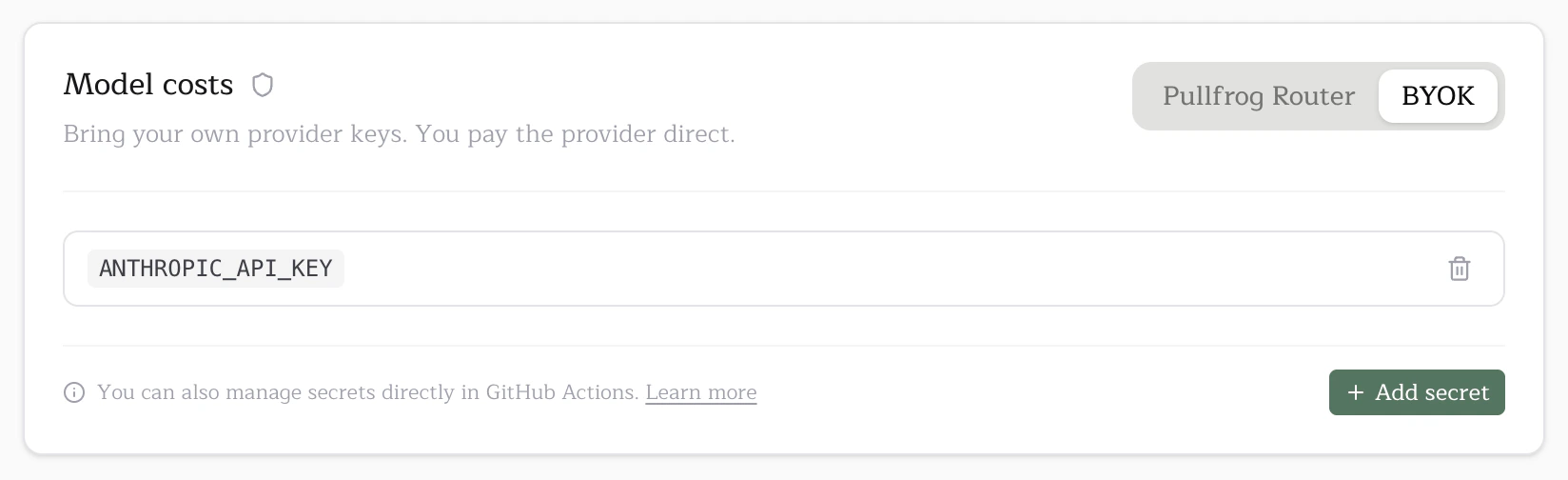
1. Open `pullfrog.com/console/` and find the **Model usage** section of the **Billing** card.
2. Switch to the **BYOK** tab.
3. Find your provider card, click **Set up**, and follow its credential instructions.
 The Add secret modal lets you scope the secret to your whole organization or a specific repo:
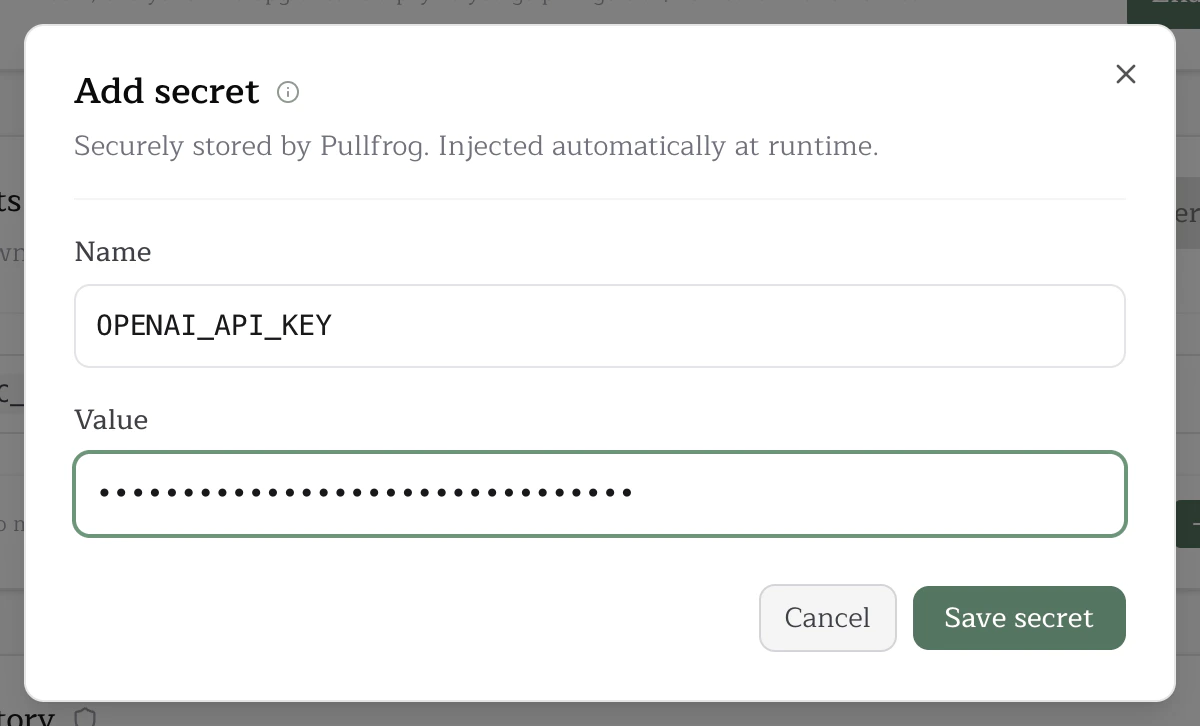 Org-level secrets are inherited by every repo in the organization; repo-level secrets override an org secret of the same name for that one repo.
You can also manage secrets per repo from the **Secrets** card on the repo console:
Org-level secrets are inherited by every repo in the organization; repo-level secrets override an org secret of the same name for that one repo.
You can also manage secrets per repo from the **Secrets** card on the repo console:
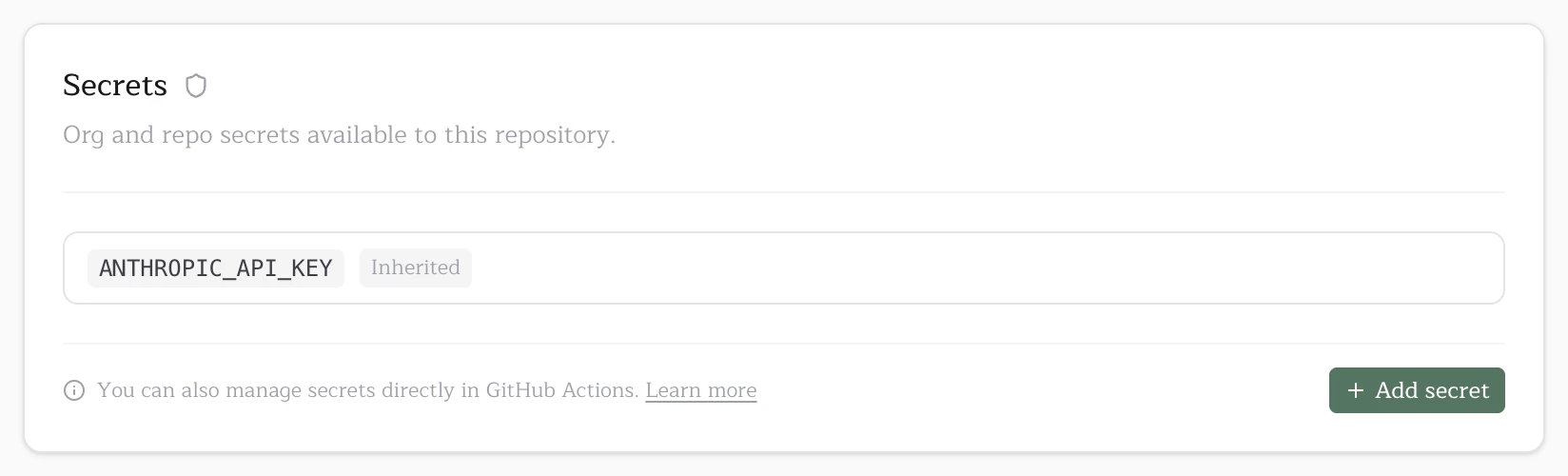 Inherited org secrets show up here read-only so it's clear which keys are available to the repo. Adding a repo secret with the same name overrides the org one for this repo only.
### GitHub Actions secrets (alternative)
If you'd rather keep keys in GitHub Actions secrets, for example, because you already have org-wide secret rotation tooling there, Pullfrog also reads keys from the workflow `env:` block.
1. Add the secret in GitHub. Org-level (`github.com/organizations//settings/secrets/actions` → **New organization secret**) or repo-level (`github.com///settings/secrets/actions` → **New repository secret**).
2. Map it into `pullfrog.yml`:
```diff theme={null}
jobs:
pullfrog:
runs-on: ubuntu-latest
steps:
- name: Run agent
uses: pullfrog/pullfrog@v0
with:
prompt: ${{ inputs.prompt }}
+ env:
+ ANTHROPIC_API_KEY: ${{ secrets.ANTHROPIC_API_KEY }}
```
If a key is set in both the workflow `env:` and Pullfrog secrets, **the workflow value wins**. This lets you override Pullfrog-stored secrets per-workflow when needed.
### Custom providers
The workflow `env:` block isn't limited to the providers listed in the console. Whatever you put there reaches the agent as-is, and any provider in the [models.dev](https://models.dev) catalog switches on the moment its API-key variable is present — Groq, Mistral, Cerebras, Together, Fireworks, and the rest. Add the key as a GitHub Actions secret, map it into `env:`, and set the `model` input to that provider's models.dev specifier.
There is nothing to wait on us for and nothing to enable. Full walkthrough: [custom providers](/models#custom-providers).
## Free models
A handful of models cost nothing per token — no card, no Router balance, no provider bill:
* **Big Pickle** (OpenCode)
* **MiMo** (OpenCode)
* **Muse Spark Contributor** (OpenCode) — Meta's discounted tier; Meta may train on the prompts and completions
* **Union Alpha** (OpenCode) — a stealth preview, free for a limited time; the provider may retain prompts and completions
They are free, not credential-free. OpenCode Zen still authenticates the request, so `OPENCODE_API_KEY` has to be set like any other provider key; a run without it stops at session start with `No provider available`. What a free model saves you is the bill, not the key.
## Amazon Bedrock
If you want to route through your own AWS Bedrock account instead of going to a model vendor directly, see [Amazon Bedrock](/bedrock) for the multi-secret setup. Bedrock is BYOK only and uses pinned model IDs (no aliasing) so enterprise compliance and provisioned-throughput contracts stay predictable.
## Google Vertex AI
If you want to route through your own Google Cloud project, see [Google Vertex AI](/vertex) for the service-account setup. Vertex AI is BYOK only and uses pinned model IDs through `VERTEX_MODEL_ID`.
## Azure OpenAI
If your organization buys models through Azure, see [Azure OpenAI](/azure) for the five-value setup. Azure is BYOK only and routes on your **deployment** name via `AZURE_DEPLOYMENT` rather than a model alias, so inference bills to your Azure subscription and Azure credits apply.
## OpenAI-compatible endpoints
If you route through your own gateway or run your own inference — a LiteLLM proxy, a Cloudflare AI Gateway, a self-hosted vLLM server — see [OpenAI-compatible endpoints](/openai-compatible). One entry covers every such endpoint: you supply the base URL, key, model ID, and that model's two token limits through `OPENAI_COMPATIBLE_*`. BYOK only.
## Gateways and proxies
Route a provider's requests through your own host — a LiteLLM proxy, a corporate egress proxy, an AI gateway — while keeping your normal model selection. There's no separate model entry to pick.
Set it in the console under **Set up a proxy or gateway** on that provider's setup card, or from your workflow `env:`:
```yaml theme={null}
env:
OPENAI_BASE_URL: https://gateway.internal.example.com/v1
OPENAI_API_KEY: ${{ secrets.OPENAI_API_KEY }}
```
| Provider | Variable |
| --------- | -------------------- |
| Anthropic | `ANTHROPIC_BASE_URL` |
| OpenAI | `OPENAI_BASE_URL` |
Put only the host in the base URL — a credential embedded in it is not treated as one. Other providers have their own routes: [Azure OpenAI](/azure) builds its endpoint from `AZURE_RESOURCE_NAME`, and any endpoint serving a model we don't catalog belongs on [OpenAI-compatible endpoints](/openai-compatible), which is also the right home for a gateway whose model list is its own.
Pullfrog does not check a gateway credential against the provider's own host before a run, because your token is not valid there and asking would only ever produce a false rejection. A gateway that refuses the credential surfaces its own error from the run instead.
### Anthropic
Anthropic models run through Claude Code, which honors `ANTHROPIC_BASE_URL` natively.
```yaml theme={null}
env:
ANTHROPIC_BASE_URL: https://gateway.internal.example.com
ANTHROPIC_API_KEY: ${{ secrets.ANTHROPIC_API_KEY }}
```
Pullfrog talks to your gateway in Anthropic's native format, so prompt caching and extended thinking survive the hop.
Which credential variable you use depends on the header your gateway reads. `ANTHROPIC_API_KEY` sends the value as `x-api-key`; `ANTHROPIC_AUTH_TOKEN` sends it as `Authorization: Bearer`. Both are accepted, and a gateway that reads the wrong one answers `401` — if that happens, swap the variable and re-run.
```yaml theme={null}
env:
ANTHROPIC_BASE_URL: https://gateway.internal.example.com
ANTHROPIC_AUTH_TOKEN: ${{ secrets.GATEWAY_TOKEN }}
```
This works for Claude models only. Several providers publish an `/anthropic` endpoint serving their *own* models, but Anthropic [doesn't support routing Claude Code to non-Claude models through a gateway](https://code.claude.com/docs/en/llm-gateway) — and all of them expose an OpenAI-compatible API too, so use [OpenAI-compatible endpoints](/openai-compatible) for those.
### OpenAI
`OPENAI_BASE_URL` re-points the OpenAI provider itself, which speaks the **Responses API** (`POST /v1/responses`). Point it at a gateway that serves that endpoint.
```yaml theme={null}
env:
OPENAI_BASE_URL: https://gateway.internal.example.com/v1
OPENAI_API_KEY: ${{ secrets.OPENAI_API_KEY }}
```
Most third-party gateways speak the older Chat Completions API (`POST /v1/chat/completions`) instead — despite the name, that is what "OpenAI-compatible" refers to almost everywhere. If yours does, use [OpenAI-compatible endpoints](/openai-compatible) rather than this variable.
## Troubleshooting
**"Missing API key" error in GitHub Actions**
The agent couldn't find a valid key at runtime. Check, in order:
1. The selected model's required env var is set somewhere, Pullfrog secrets (Billing → Model usage → BYOK) or a workflow `env:` mapping.
2. The secret name matches the provider's env var exactly (e.g. `ANTHROPIC_API_KEY`, not `CLAUDE_API_KEY`).
3. If you used GitHub secrets, the secret is mapped in your `pullfrog.yml` `env:` block, Actions only injects what the workflow file lists.
**"Missing API key" warning in the Pullfrog console**
The console couldn't find the env var the selected model needs. Add the secret via the **Model usage** section of the Billing card or switch to a model whose key you already have.
Inherited org secrets show up here read-only so it's clear which keys are available to the repo. Adding a repo secret with the same name overrides the org one for this repo only.
### GitHub Actions secrets (alternative)
If you'd rather keep keys in GitHub Actions secrets, for example, because you already have org-wide secret rotation tooling there, Pullfrog also reads keys from the workflow `env:` block.
1. Add the secret in GitHub. Org-level (`github.com/organizations//settings/secrets/actions` → **New organization secret**) or repo-level (`github.com///settings/secrets/actions` → **New repository secret**).
2. Map it into `pullfrog.yml`:
```diff theme={null}
jobs:
pullfrog:
runs-on: ubuntu-latest
steps:
- name: Run agent
uses: pullfrog/pullfrog@v0
with:
prompt: ${{ inputs.prompt }}
+ env:
+ ANTHROPIC_API_KEY: ${{ secrets.ANTHROPIC_API_KEY }}
```
If a key is set in both the workflow `env:` and Pullfrog secrets, **the workflow value wins**. This lets you override Pullfrog-stored secrets per-workflow when needed.
### Custom providers
The workflow `env:` block isn't limited to the providers listed in the console. Whatever you put there reaches the agent as-is, and any provider in the [models.dev](https://models.dev) catalog switches on the moment its API-key variable is present — Groq, Mistral, Cerebras, Together, Fireworks, and the rest. Add the key as a GitHub Actions secret, map it into `env:`, and set the `model` input to that provider's models.dev specifier.
There is nothing to wait on us for and nothing to enable. Full walkthrough: [custom providers](/models#custom-providers).
## Free models
A handful of models cost nothing per token — no card, no Router balance, no provider bill:
* **Big Pickle** (OpenCode)
* **MiMo** (OpenCode)
* **Muse Spark Contributor** (OpenCode) — Meta's discounted tier; Meta may train on the prompts and completions
* **Union Alpha** (OpenCode) — a stealth preview, free for a limited time; the provider may retain prompts and completions
They are free, not credential-free. OpenCode Zen still authenticates the request, so `OPENCODE_API_KEY` has to be set like any other provider key; a run without it stops at session start with `No provider available`. What a free model saves you is the bill, not the key.
## Amazon Bedrock
If you want to route through your own AWS Bedrock account instead of going to a model vendor directly, see [Amazon Bedrock](/bedrock) for the multi-secret setup. Bedrock is BYOK only and uses pinned model IDs (no aliasing) so enterprise compliance and provisioned-throughput contracts stay predictable.
## Google Vertex AI
If you want to route through your own Google Cloud project, see [Google Vertex AI](/vertex) for the service-account setup. Vertex AI is BYOK only and uses pinned model IDs through `VERTEX_MODEL_ID`.
## Azure OpenAI
If your organization buys models through Azure, see [Azure OpenAI](/azure) for the five-value setup. Azure is BYOK only and routes on your **deployment** name via `AZURE_DEPLOYMENT` rather than a model alias, so inference bills to your Azure subscription and Azure credits apply.
## OpenAI-compatible endpoints
If you route through your own gateway or run your own inference — a LiteLLM proxy, a Cloudflare AI Gateway, a self-hosted vLLM server — see [OpenAI-compatible endpoints](/openai-compatible). One entry covers every such endpoint: you supply the base URL, key, model ID, and that model's two token limits through `OPENAI_COMPATIBLE_*`. BYOK only.
## Gateways and proxies
Route a provider's requests through your own host — a LiteLLM proxy, a corporate egress proxy, an AI gateway — while keeping your normal model selection. There's no separate model entry to pick.
Set it in the console under **Set up a proxy or gateway** on that provider's setup card, or from your workflow `env:`:
```yaml theme={null}
env:
OPENAI_BASE_URL: https://gateway.internal.example.com/v1
OPENAI_API_KEY: ${{ secrets.OPENAI_API_KEY }}
```
| Provider | Variable |
| --------- | -------------------- |
| Anthropic | `ANTHROPIC_BASE_URL` |
| OpenAI | `OPENAI_BASE_URL` |
Put only the host in the base URL — a credential embedded in it is not treated as one. Other providers have their own routes: [Azure OpenAI](/azure) builds its endpoint from `AZURE_RESOURCE_NAME`, and any endpoint serving a model we don't catalog belongs on [OpenAI-compatible endpoints](/openai-compatible), which is also the right home for a gateway whose model list is its own.
Pullfrog does not check a gateway credential against the provider's own host before a run, because your token is not valid there and asking would only ever produce a false rejection. A gateway that refuses the credential surfaces its own error from the run instead.
### Anthropic
Anthropic models run through Claude Code, which honors `ANTHROPIC_BASE_URL` natively.
```yaml theme={null}
env:
ANTHROPIC_BASE_URL: https://gateway.internal.example.com
ANTHROPIC_API_KEY: ${{ secrets.ANTHROPIC_API_KEY }}
```
Pullfrog talks to your gateway in Anthropic's native format, so prompt caching and extended thinking survive the hop.
Which credential variable you use depends on the header your gateway reads. `ANTHROPIC_API_KEY` sends the value as `x-api-key`; `ANTHROPIC_AUTH_TOKEN` sends it as `Authorization: Bearer`. Both are accepted, and a gateway that reads the wrong one answers `401` — if that happens, swap the variable and re-run.
```yaml theme={null}
env:
ANTHROPIC_BASE_URL: https://gateway.internal.example.com
ANTHROPIC_AUTH_TOKEN: ${{ secrets.GATEWAY_TOKEN }}
```
This works for Claude models only. Several providers publish an `/anthropic` endpoint serving their *own* models, but Anthropic [doesn't support routing Claude Code to non-Claude models through a gateway](https://code.claude.com/docs/en/llm-gateway) — and all of them expose an OpenAI-compatible API too, so use [OpenAI-compatible endpoints](/openai-compatible) for those.
### OpenAI
`OPENAI_BASE_URL` re-points the OpenAI provider itself, which speaks the **Responses API** (`POST /v1/responses`). Point it at a gateway that serves that endpoint.
```yaml theme={null}
env:
OPENAI_BASE_URL: https://gateway.internal.example.com/v1
OPENAI_API_KEY: ${{ secrets.OPENAI_API_KEY }}
```
Most third-party gateways speak the older Chat Completions API (`POST /v1/chat/completions`) instead — despite the name, that is what "OpenAI-compatible" refers to almost everywhere. If yours does, use [OpenAI-compatible endpoints](/openai-compatible) rather than this variable.
## Troubleshooting
**"Missing API key" error in GitHub Actions**
The agent couldn't find a valid key at runtime. Check, in order:
1. The selected model's required env var is set somewhere, Pullfrog secrets (Billing → Model usage → BYOK) or a workflow `env:` mapping.
2. The secret name matches the provider's env var exactly (e.g. `ANTHROPIC_API_KEY`, not `CLAUDE_API_KEY`).
3. If you used GitHub secrets, the secret is mapped in your `pullfrog.yml` `env:` block, Actions only injects what the workflow file lists.
**"Missing API key" warning in the Pullfrog console**
The console couldn't find the env var the selected model needs. Add the secret via the **Model usage** section of the Billing card or switch to a model whose key you already have.